Production scheduling for a small shop: a demo-workshop walkthrough
High-mix, low-volume scheduling involves orders, routings, machines and available time. FlexScheduler creates a finite-capacity plan using one primary rule, then lets a planner review Gantt charts, load and changes before publishing. This walkthrough uses the built-in fictional sheet-metal workshop.
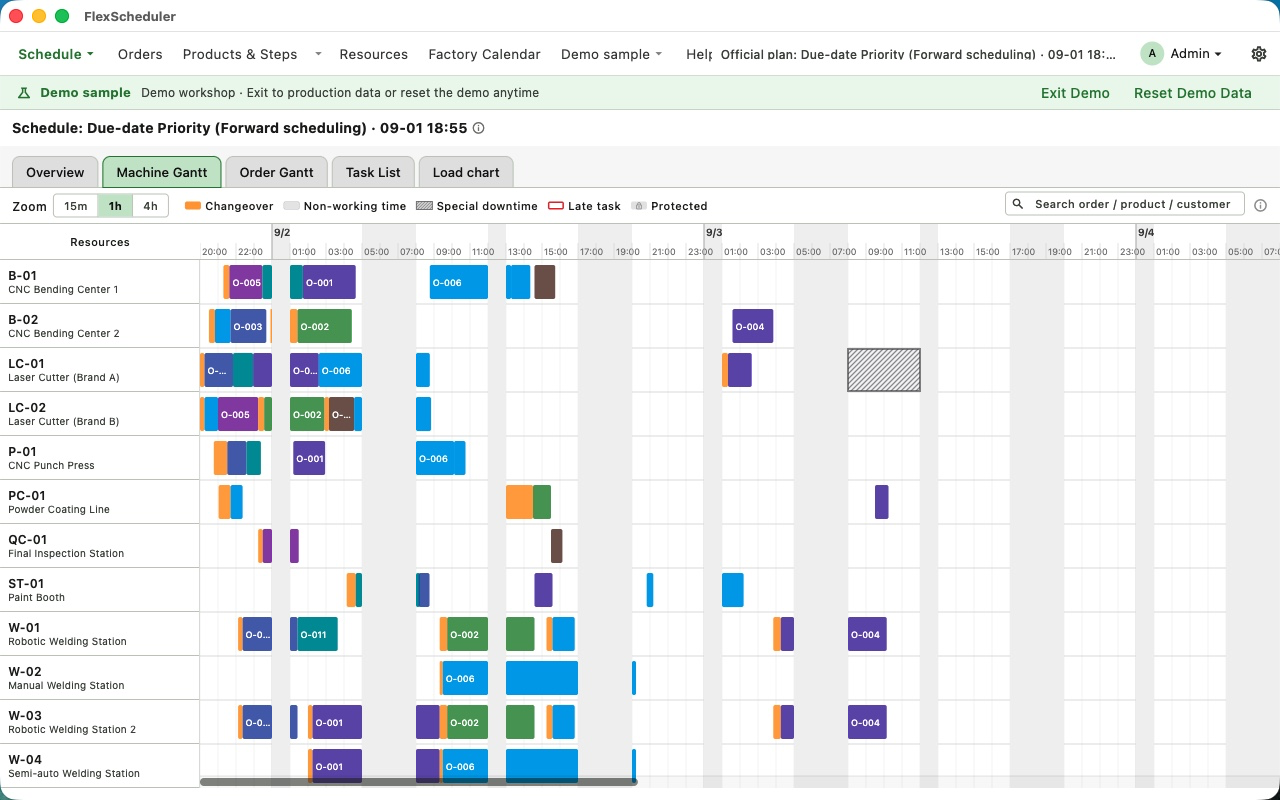
Understand the data through the demo
Open the built-in workshop and review orders, product routings, machines and the factory calendar. Observe how routing steps relate to resources and how available calendar time affects the schedule. Walk through the demo before organizing your own factory data.
Choose one primary objective
Capacity, due-date and changeover priorities produce plans for different objectives. Due-date scheduling supports forward and backward approaches. Select the objective that fits the current business problem; do not reduce different objectives to an unconditional claim of a single best plan.
Review the overview, Gantt charts and load
Start with the scenario overview. Use machine Gantt to inspect task placement and sequences, order Gantt to follow operations, and the load chart to examine resource usage. When a risk appears, check orders, routings and calendars rather than judging a plan only by how densely packed it looks.
Review changes before publishing
Use the event workflows to handle rush orders or machine downtime. Where near-term work must be protected, use freeze windows and inspect the change details. The planner decides when to publish the official plan and can export machine task sheets as Excel or PDF.
Workflow checklist
| Stage | What to review |
|---|---|
| Prepare | Review orders, routings, machines, calendars and labor conditions |
| Generate | Choose capacity, due-date or changeover priority |
| Inspect | Overview, machine Gantt, order Gantt and load charts |
| Publish | Review changes, publish the official plan and export task sheets |
Frequently asked questions
Does this demonstrate a measured productivity improvement?
No. It is a workflow guide using fictional data, not a customer before-and-after study. It does not promise a fixed improvement.
Can FlexScheduler replace ERP or MES?
No. It is a lightweight scheduling decision tool without BOM, inventory, purchasing or MES shop-floor reporting, and is not an enterprise open-rule APS.
Must factory data be uploaded to the cloud?
Scheduling and recalculation run locally. Factory data stays on your Mac or in your chosen folder. Purchases and restoration may connect to Apple services.
Product and next steps
This guide is based on the product feature descriptions and screenshots. It is a workflow explanation, not a customer test report.
View product and download