How to compare cores, windings and losses in an inductor design
An inductor design needs more than an inductance value. Useful comparisons keep the electrical conditions consistent and review cores, windings, losses and temperature rise together. This guide uses Inductor Design Pro screenshots to outline a design review.
Start with consistent electrical conditions
Record the topology, input-voltage range, output requirements, switching frequency and operating mode. The app supports Buck, Boost, Forward and interleaved Buck designs. Use the same conditions for every candidate in a comparison so the results answer the same design question.
Review the core and winding as one candidate
Review core material, shape, winding and insulation choices together. Record the selections in the core-and-winding screen before examining the results. Custom material and core libraries are supported; retain the manufacturer data source and its applicable conditions when entering your own data.
Compare results on the same basis
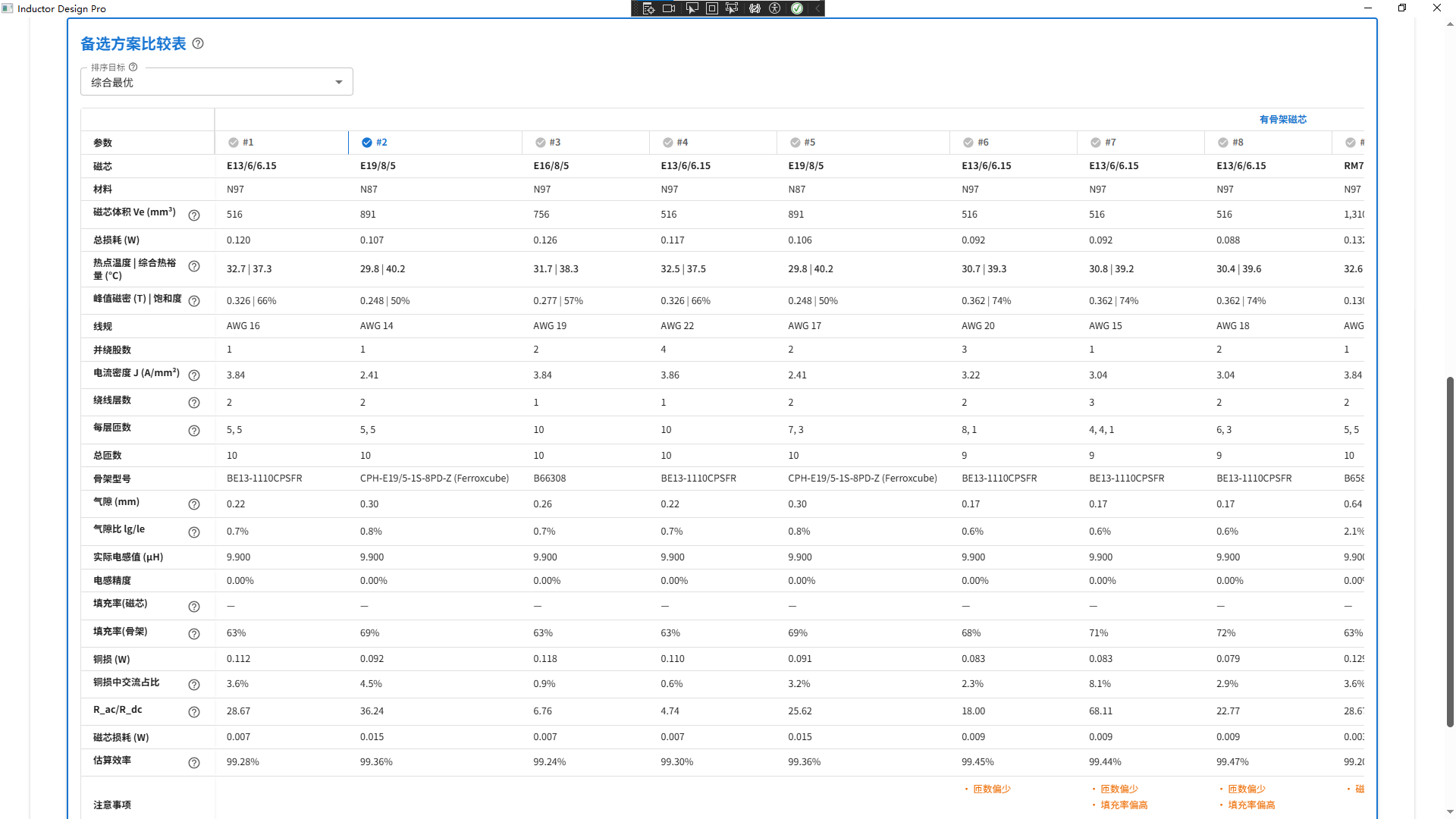
Use the candidate comparison to examine core choices, losses and temperature rise. Check whether each candidate meets your requirements before choosing a result based on a single low value. If frequency or another input changes, recalculate and keep the revised results distinct from the original comparison.
Keep the decision trail in the report
The summary report covers magnetics, windings, thermal results and the bill of materials. Keep input specifications, material sources and selection reasons with the report. Calculations support candidate screening; the interface example shown here is not a prototype measurement.
Workflow checklist
| Stage | What to review |
|---|---|
| Inputs | Topology, input range, output requirements, frequency and mode |
| Candidates | Material, core, winding and insulation conditions |
| Results | Losses, temperature rise and design constraints |
| Handoff | Summary report, bill of materials and selection rationale |
Frequently asked questions
Can I calculate an inductor on this website?
No. This site explains the product and workflow. Install the App Store application to run calculations.
Which operating modes are supported?
The product supports CCM, DCM and BCM. Choose the mode for your topology and operating conditions, using the current app interface.
Product and next steps
This guide is based on the product feature descriptions and screenshots. It is a workflow explanation, not a customer test report.
View product and download