Flyback transformer design: from specifications to cores, windings and reports
A clear flyback design workflow starts with input and output requirements and an operating mode, then moves through cores, windings, losses and thermal review. This guide explains how Flyback Transformer Designer organizes that workflow without inventing calculated component values.
Document the input and every output
Record the input range, switching frequency and the requirements for each secondary output. Keep separate records for multiple outputs so none is lost during revisions. Save project constraints alongside electrical specifications as the basis for calculations and review.
Choose the operating mode before iterating
The app supports DCM, BCM, QR and CCM flyback modes. Choose a mode consistent with your intended design and control approach, and review the recalculated results after changing it. This guide does not assume one mode is suitable for every project.
Review cores and windings with parameter sweeps
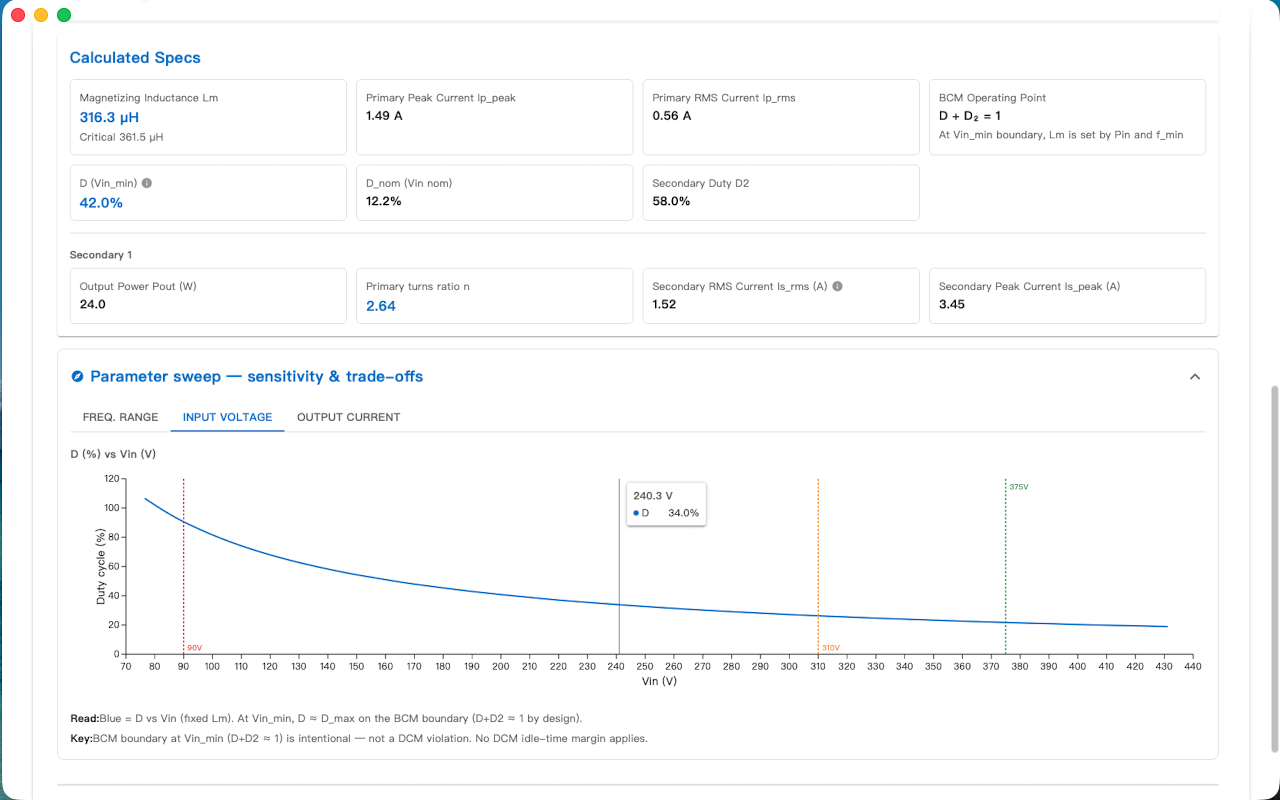
Use calculated results and parameter sweeps to examine how input changes affect the design, then iterate cores and windings together. Retain the input conditions for each candidate. Results produced from different specifications should not be presented as a comparison under identical conditions.
Finish with loss, thermal and report review
Review losses, temperature rise and report output for the selected candidate. Record final inputs, materials and winding information, and list any conditions that still need verification. Software results are one part of the design record; this page does not claim a prototype or production validation.
Workflow checklist
| Stage | What to review |
|---|---|
| Specifications | Input range, switching frequency, outputs and constraints |
| Operating mode | DCM / BCM / QR / CCM |
| Iteration | Cores, windings, parameter sweeps and calculated results |
| Review | Losses, temperature rise, report and remaining checks |
Frequently asked questions
Are multiple outputs supported?
Yes. The app supports multiple secondary outputs and core-and-winding design iteration.
Where can I use the complete workflow?
Install Flyback Transformer Designer from the App Store. Check the listing for current compatibility, versions and pricing.
Product and next steps
This guide is based on the product feature descriptions and screenshots. It is a workflow explanation, not a customer test report.
View product and download